Teacher | Virginia Trekker | Instructional Technologist

Tag: Google (Page 1 of 2)

Method27- Week 2

This is what learning is supposed to look like!

The third graders completed their first experiment during my time in Brittney Royal’s class last week.  The students completed a simple experiment that used the old school combination of vinegar and baking soda.  We followed the basic recipe found at eHow.com. However, we increased the amount of each ingredient to cause a larger and more dramatic reaction.

To make this simple experiment more “21st Century” we did the following:

  • The students worked with their teammates to record their hypothesis and conclusions using a GoogleDoc.
  • After the experiments were conducted the students had to use internet resources to research the reaction that they just witnessed.  The students had to enter their individual answers on to the Method27 blog.
  • The students were also challenged with an additional question.  The question would lead them to discover the teams endothermic and exothermic reactions.  Both of which are not covered in the current 3rd Grade curriculum.


The Scientific Method

Today was the beginning of a great extended project, Method27.  The entire project will be focused around matter.  At the conclusion of the project, it is our goal for the students to design experiments that will help others determine if they are dealing with solids, liquids, or gases.  I am working with Brittney Royal, 3rd Grade at Carver Elementary, over the next few weeks on building and modeling 21st Century Skills.  Throughout the lessons the students will be learning how to research, conduct experiments, design experiments, analyze data, and work collaboratively.

Review of Day 1 Activities:

  • Before visiting the classroom I built a website and a series of Google Docs that the students will use to enter the information they find during the research process.  While the groups were determined by the teacher, each group has a leader and the group determined the roles of each member.
  • The students met as a group to come up with a team name and record the members of the group on the GoogleDoc.
  • The students used their group’s GoogleDoc and a set of links [1. Links were given to them to help expedited the initial research period.] to compose the definitions of solids, liquids, and gases.  GoogleDocs allow multiple users to enter information on the same document at the same time.  Google Docs are great for online communication and collaboration.

Next week’s goals:

We will complete our first experiment next week.  We are going to work on making hypotheses and conclusions.  After the experiment is complete, the students will be researching the science behind what took place during the experiment.

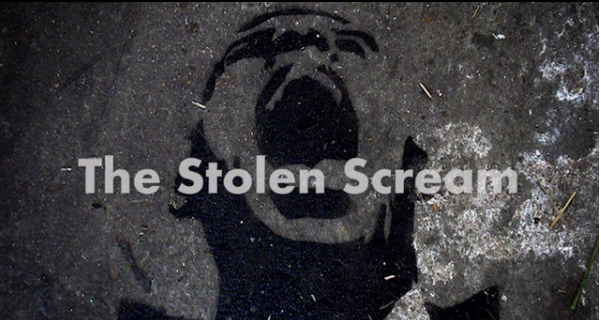
The Stolen Scream: The Battle over Intellectual Property

With the internet being available in so many places and people’s need for quick access to resources, intellectual property rights seem to be getting squashed. As a technology educator, I try my best to stress the importance of citing sources and using images/videos that are free use under copyright laws. It is important for my elementary school students to learn the importance of this now, so as they get older and technology evolves, they will be good “digital citizens.”

I found an amazing story online at MSNBC.com about Noam Galai. Noam, originally from Israel, is now living in New York. He took several pictures of himself and posted them onto his Flickr account. His image, actually his face, is now being used in the anti-government protests in the Middle East, book covers in Mexico, and even T-shirts in his own neighborhood. Please take a moment to watch the video below and read the msnbc.com article as well. Check out Noam’s Scream Everywhere page at: http://screameverywhere.com/wordpress/

If you need photos that are copyright free, you can use FlickrCommons.

Landmark College has provided guidelines for correctly citing online resources in APA format.

The Stolen Scream: A Story About Noam Galai from FStoppers on Vimeo.

Typing Races?

Ben Rimes (@techsavvyed) and Jason Valade(@Jay2thaVee) posted a blog post and video showing their creative use of Google Docs to conduct typing races.  This could be a great way to motivate our kids to practice their typing skills while they work through their Type2Learn lessons.  To read Ben’s full blog post click here: http://www.techsavvyed.net/?p=1299

If you are interested in setting something like this up in your classroom, let me know, we already have the Google Accounts set up.

The video below is from YouTube.  Teachers, you will have to override the filter to view it at school.  It is definitely worth watching.  Direct YouTube link: http://www.youtube.com/watch?v=5e3pMBg3_o0

Henrico21- Longdale 4th

The 4th grade teachers at Longdale, Jen Travers, Crista Wheaton, and Leigh Hershey, challenged their students to create newscasts about weather systems.  The students teamed up with students from each classroom and wrote their scripts collaboratively using GoogleDocs.  Each classroom was charged with writing one portion of the newscast.  Once the scripts were drafted, the discussion of “edits” took place using the chat feature.  The projects were filmed using props, Promethean boards, and even fake snow!  The final video products were edited using iMovie.  Below are 2 examples of the final iMovies.  Great job 4th graders.

Drought Newscast from Frank Fitzpatrick on Vimeo.

Blizzard Newscast from Frank Fitzpatrick on Vimeo.

« Older posts