Teacher | Virginia Trekker | Instructional Technologist

Tag: Internet (Page 1 of 2)

The Scientific Method

Today was the beginning of a great extended project, Method27.  The entire project will be focused around matter.  At the conclusion of the project, it is our goal for the students to design experiments that will help others determine if they are dealing with solids, liquids, or gases.  I am working with Brittney Royal, 3rd Grade at Carver Elementary, over the next few weeks on building and modeling 21st Century Skills.  Throughout the lessons the students will be learning how to research, conduct experiments, design experiments, analyze data, and work collaboratively.

Review of Day 1 Activities:

  • Before visiting the classroom I built a website and a series of Google Docs that the students will use to enter the information they find during the research process.  While the groups were determined by the teacher, each group has a leader and the group determined the roles of each member.
  • The students met as a group to come up with a team name and record the members of the group on the GoogleDoc.
  • The students used their group’s GoogleDoc and a set of links [1. Links were given to them to help expedited the initial research period.] to compose the definitions of solids, liquids, and gases.  GoogleDocs allow multiple users to enter information on the same document at the same time.  Google Docs are great for online communication and collaboration.

Next week’s goals:

We will complete our first experiment next week.  We are going to work on making hypotheses and conclusions.  After the experiment is complete, the students will be researching the science behind what took place during the experiment.
Paper Airplanes….. Any Questions?

This is my first attempt at creating an “Any Questions” video. The first place I saw Any Questions was on Dan Meyer’s blog. Any Questions can be followed on Twitter by following the hash tag #anyqs. The purpose of the #anyqs videos is to show a short video clip and let your students come up with their own questions to answer. It is important to let the students drive the conversation and their own learning. It doesn’t take any great video skills to make a video. All you need is something to film that will generate questions. Ben Rimes (@techsavvyed), an technology instructor from Michigan, found the craziest tree wrapping machine while picking out his Christmas Tree. I watched the video a number of times and had a bunch of questions to ask.

A friend and I are developing a bunch of lessons and a presentation that is based on paper airplanes and integrating technology into those lessons without “chasing something shiny”.  We want to take integrating technology back to the basics.  So here is my first Any Questions video. Any questions?


Weathering and Erosion

I had my first weathering and erosion questions this week.  I decided to combine 3 technologies/applications that I love to use to give my teachers the resources they needed.

Keynote

I created a Keynote slideshow for the kids to use when reviewing the terms weathering and erosion.  It is a simple slideshow that only requires the kids to fill in the blanks with the appropriate terms.  When the students have completed their slides, they can hit “play” and watch the slideshow turn into a self-playing movie with animations.

Click here to download the Keynote template.

Google Earth

Using Google Earth as a tool for teaching weathering and erosion is new for me.  Google Earth is a great tool for teaching Social Studies, but the more I use it, the more I find it useful in other content areas as well.  I searched  the globe for unique land features that have been caused by weathering and erosion.  The pushpins only lead the students to locations, it is the pictures that make the pushpins worth the trip around the world.  You can download the pushpins I created using the link below.  When you click on the downloaded icon (after you unzip the file), it will automatically launch Google Earth, and load the pushpins into your “Places” window.

[nggallery id=6]

 Click here to download the Google Earth pushpins.

Internet Links

I have to admit that collecting the websites below took more time than it should have, I blame this on my ADD.  I started reading all of the information on the sites and I hope your students will enjoy them as well.  There are also a couple of challenging jigsaw puzzles that might get your kids thinking.

Grand Canyon National Park

Carlsbad Caverns National Park

Mount Everest

Oceanside Cliffs Puzzle

Rock Bridge Puzzle

Facebook and Twitter from the Past?

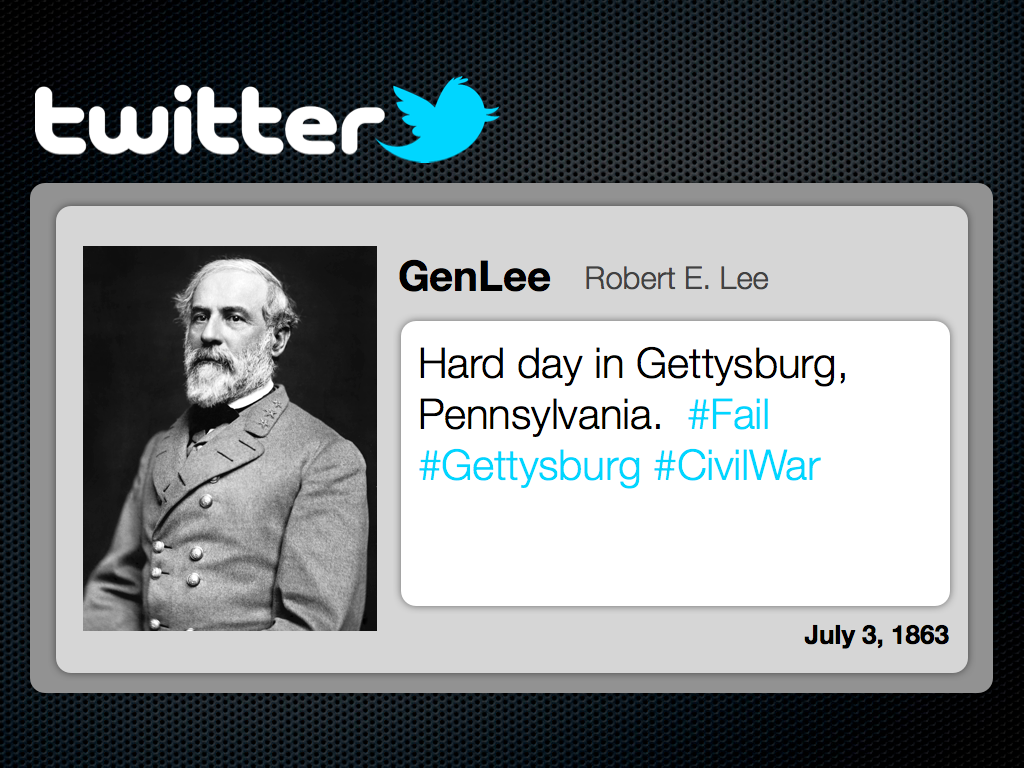
Sure George Washington and the other Founding Fathers didn’t have Facebook and Twitter, but woudn’t it have been cool if they did?  It would have been awesome to see Sacagawea’s posts about how Lewis and Clark refuse to listen and “know” where they are going.  I can imagine hew tweets [1. A message posted on Twitter consisting of 140 characters or less.] would have been re-tweeted [2. Re-tweeted messages are tweets shared in their original form by other Twitter users.] by women around the world.  The templates shared in this post are designed to let your students be creative and share the knowledge that they have gained.  These templates can be used for more than documenting the lives of historical characters.  These templates can be used for novel studies as well as creative writing.

When students use the Facebook template, they will be able to display biographical information about a historical character’s life, hobbies, career, and “friends”.  The Twitter template will challenge students to create “Tweets” that share information that is relative to the subject’s life or activities.  There is a second option inside the Twitter template, and that is the documentation of an event using a “fictional” hashtag [3. Hashtags are specific searches on Twitter using the “#” sign.  Charlie Sheen made the hashtag “#Winning” very popular during his public breakdown.]  There are example of the Facebook and Twitter templates below.  These templates were created for my MAC users, but have been exported into .ppt and .doc format.

[nggallery id=5]

Click here to download the Facebook template for MACs.

Click here to download the Twitter template for MACs.

Click here to download the Facebook template for PCs.

Click here to download the Twitter template for PCs.

« Older posts